Commercial lending is one of the most collaborative processes in a bank. A relationship manager brings in the deal, an underwriter digs into the numbers, a credit officer makes the call, and a closing team gets the money out the door. The trouble is that each of those people often works from a different spreadsheet, inbox, or shared drive. Documents go missing, conditions are tracked on paper, and nobody can say with confidence where a loan actually stands.
A unified lending workspace fixes that. When the application, the borrower's documents, the collateral, the credit analysis, and the approval all live on one record, everyone sees the same picture. That is the idea behind OpenLend 360, a commercial-lending MVP I built on Salesforce to show what a guided commercial lending workflow can look like using standard platform tools.
What is OpenLend 360?
OpenLend 360 is an original Salesforce commercial-lending MVP created for learning, demonstrations, and architecture discussions. It is an independent, educational, open-source-style project. It isn't a commercial product, and it isn't built on, connected to, or derived from any vendor's lending software.
The design draws on general Salesforce Financial Services Cloud concepts and on common commercial-lending practice: how banks move a loan from intake to funding, which controls regulators and credit policies expect, and how teams divide responsibility. Everything in it, from the data model to the Lightning components, is original Salesforce configuration, Flow automation, and Apex, packaged as Salesforce DX source so it can be deployed to a Developer Edition or sandbox in minutes.
What the MVP demonstrates
The goal was to cover the full life of a business loan in a way that feels realistic to lenders, without trying to be a complete banking platform. Here is what you can walk through end to end:
- Commercial Loan Application record type. A dedicated record type keeps commercial requests, fields, and page layouts separate from other lending lines.
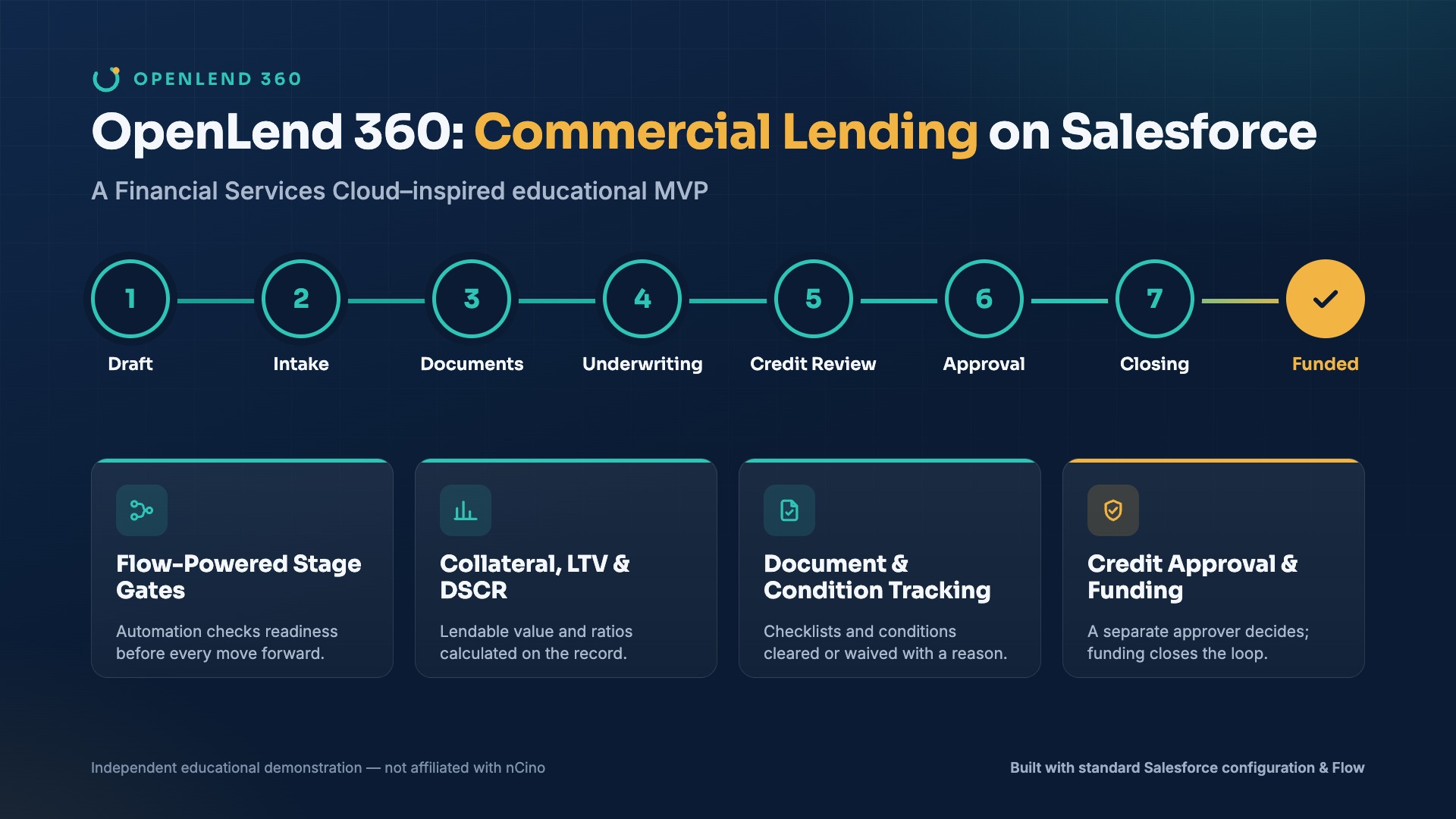
- A clear loan lifecycle. Each application moves through Draft, Intake Complete, Document Collection, Underwriting, Credit Review, Approved, Closing, and Funded, shown on a Lightning Path with guidance at every step.
- A dynamic Lightning workspace. Relationship managers, underwriters, and credit approvers each see what matters to them: the loan request, borrower and guarantors, financials, collateral, documents, the credit memo, and conditions.
- Document checklist and borrower-document tracking. When an application is created, a checklist of required items such as tax returns, financial statements, and bank statements is generated automatically. Each item is tracked from Requested to Accepted, with who reviewed it and when.
- Loan conditions. Conditions are split into prior-to-approval and prior-to-closing, and each one must be satisfied or formally waived with a reason before the loan can advance.
- Collateral management. Users capture each asset with its appraised value and advance rate. The system works out lendable value and rolls it up to a loan-to-value ratio on the application.
- Financial analysis. Net operating income and annual debt service feed a calculated DSCR, alongside total exposure and a risk rating.
- Segregation of duties. The relationship manager, the underwriter, and a separate credit approver are distinct roles, so the person who builds the deal isn't the one who approves it.
- Credit memo and decision. The application records a credit memo summary, a recommended decision, approval status, approved amount and rate, an approval expiration date, and finally the funding date and funded amount.
- Next Best Action guidance. A plain-language prompt tells the user what is holding the loan up, whether that's missing documents, open conditions, or a stage that isn't ready yet.
In a typical demo, a $400,000 equipment loan for a dental practice goes from a blank form to Funded in about fifteen minutes. Along the way it collects six documents, adds equipment collateral at a 90% advance rate, calculates a 1.50x DSCR and a 74% loan-to-value, and has a guarantor condition waived with a documented reason.
Watch the full demo
How Salesforce Flows and configuration power the experience
Most of OpenLend 360 runs on declarative tools that any Salesforce admin or architect will recognize. That was deliberate: the more you can do with configuration, the easier a solution is to maintain.
- Record-triggered flows generate the document checklist, create underwriting conditions, open review tasks, and hand the application to the credit approver at the right moment. Every flow has fault paths, so a failure produces a readable message instead of a cryptic error.
- Stage-gate validation stops a loan from moving forward until the business conditions for that stage are met. You can't reach Credit Review with required documents outstanding, and you can't reach Funded without a funding date and amount.
- Formula and calculated fields handle DSCR, loan-to-value, lendable value, document completion percentage, and funding readiness, so the numbers stay consistent everywhere they appear.
- Lightning record pages and Dynamic Related Lists put the checklist, collateral, guarantors, and conditions right where the user is working, filtered to what's relevant.
- Permission-aware approval handoffs use permission sets per persona, so only the credit approver can record the final decision, and the relationship manager sees status without being able to change it.
- Experience Cloud and borrower self-service are the natural next step. The same checklist and status data could be surfaced in a borrower portal, letting customers upload documents and check progress themselves instead of emailing attachments back and forth.
Put together, this is a practical example of Salesforce Flow automation and underwriting automation working inside a controlled credit approval workflow, without heavy custom code.
Similar lending patterns, not the same product
Anyone who has worked in bank technology will notice that some of these ideas are familiar. Mature lending platforms such as nCino are well known in the market for guided workflows, structured credit processes, document control, collateral visibility, and multi-level approvals. Those patterns have become something of a reference point for what modern commercial lending should feel like.
OpenLend 360 shows comparable business concepts using its own original Salesforce configuration and automation. When I describe it as demonstrating an "nCino-style lending workflow," I mean the general industry patterns, not the product. It doesn't use, copy, or integrate with any nCino software, screens, or content, and it isn't a substitute for a commercial lending platform. It's a way to understand the underlying ideas and see how far standard Salesforce can take them.
Who can use this MVP
Because it's small, readable, and deployable with the Salesforce CLI, OpenLend 360 works well in a few situations:
- Learning. Admins and developers can study a realistic data model, flows, validation rules, and Lightning Web Components in a domain that's hard to find good examples for.
- Internal proof of concept. Teams can show stakeholders what a loan origination MVP on Salesforce might look like before committing budget.
- Discovery workshops. Walking lenders through a working lifecycle is a fast way to surface their real stages, documents, and approval rules.
- Architecture prototypes. Architects can test data-model and automation decisions for a Salesforce FSC lending org before building the production version.
- A starting point. With the right review and hardening, the structure can be adapted into a tailored implementation for a specific lender.
Need a tailored commercial-lending solution on Salesforce?
Every lender's process is a little different. Credit policies, approval limits, document requirements, and core-banking integrations all shape what the right solution looks like. If your team is planning a Salesforce Financial Services Cloud or commercial-lending implementation, I can help with architecture, configuration, Flow automation, data modeling, integration design, and deployment. Get in touch through the contact page to talk about your requirements and how a focused MVP could get you moving quickly.
OPENLEND 360
Want this on your Salesforce org?
Book a paid consultation for a tailored commercial-lending build: architecture, data model, Flow automation, integrations, and deployment. Or grab the minimal MVP from GitHub to explore the core ideas on your own.
The GitHub version is a minimal starter for learning, not the full functionality shown in this article.
Disclaimer: OpenLend 360 is an independent educational demonstration. Salesforce, Financial Services Cloud, and nCino are trademarks of their respective owners. This project is not affiliated with or endorsed by nCino.